What Is Cross-Posting? A Plain-English Guide for Creators
The clearest explanation of cross-posting you'll read — what it means, why creators swear by it, and the mistakes that quietly kill your reach.
The Crossposting Team
Crossposting.xyz
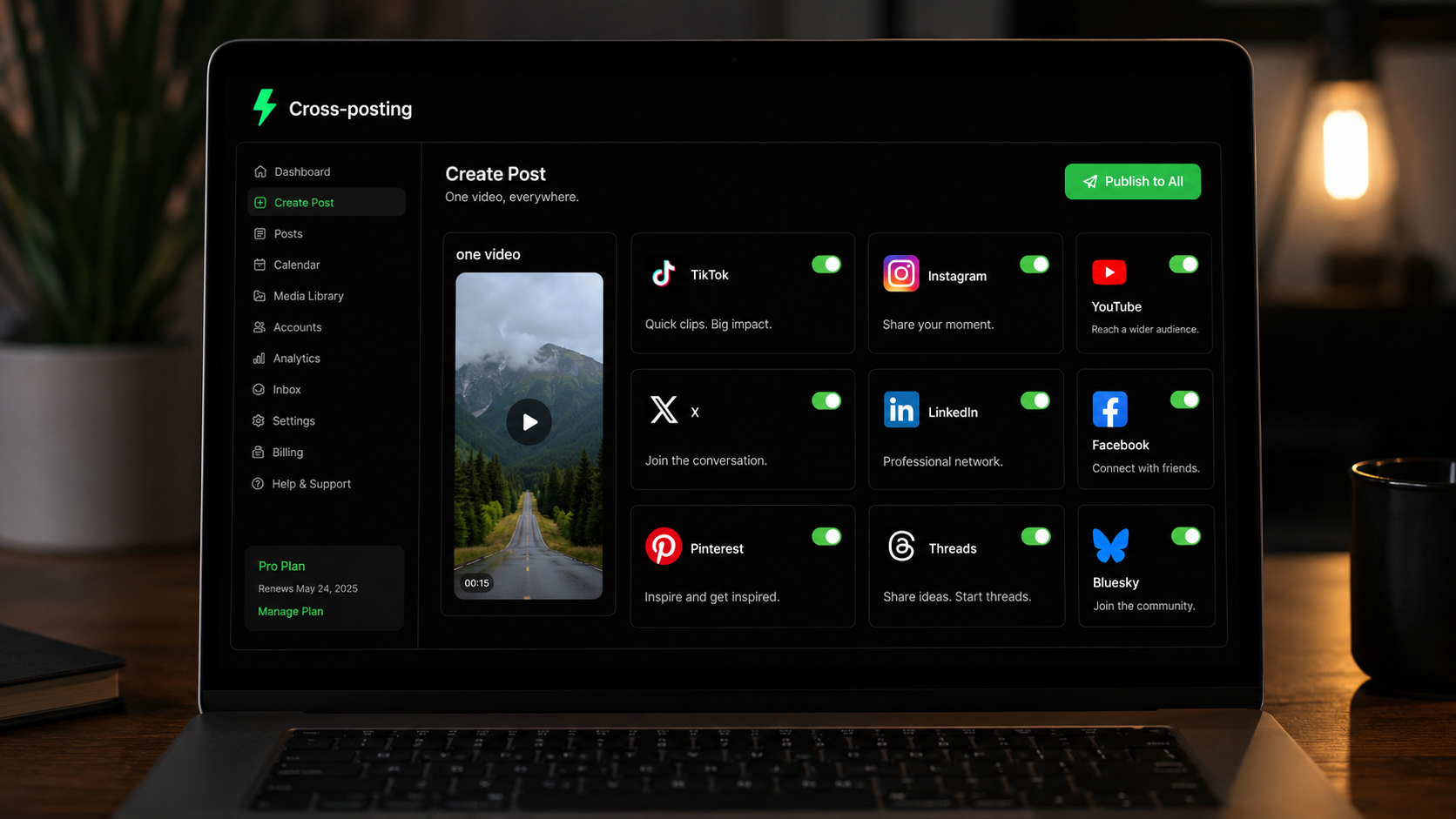
Cross-posting is the practice of taking one piece of content and publishing it across multiple social media platforms, adapted so it looks native on each one. Instead of making a separate video for TikTok, another for Reels, and another for Shorts, you make it once and put it everywhere. It's the single highest-leverage habit in organic social, and most creators either skip it or do it in a way that hurts them.
This guide explains what cross-posting actually means, why it works, where people get it wrong, and how to start. No jargon, no fluff.
Cross-posting, defined
At its simplest, cross-posting means: one idea, many platforms. You create a video, image, or written post, then publish a version of it to every network where your audience hangs out. The core content stays the same. The packaging (caption length, hashtags, aspect ratio) changes to fit each platform.
People sometimes confuse cross-posting with two other things. It helps to draw the line clearly.
| Term | What it means | Good idea? |
|---|---|---|
| Cross-posting | One piece of content, adapted natively to many platforms | Yes |
| Reposting | Sharing someone else's content, or your own old content, again | Sometimes |
| Auto-sharing | One app auto-forwarding to another (IG → FB with the logo) | No |
Native cross-posting vs lazy cross-posting
There's a right way and a reach-killing way, and the difference decides whether cross-posting helps or hurts you.
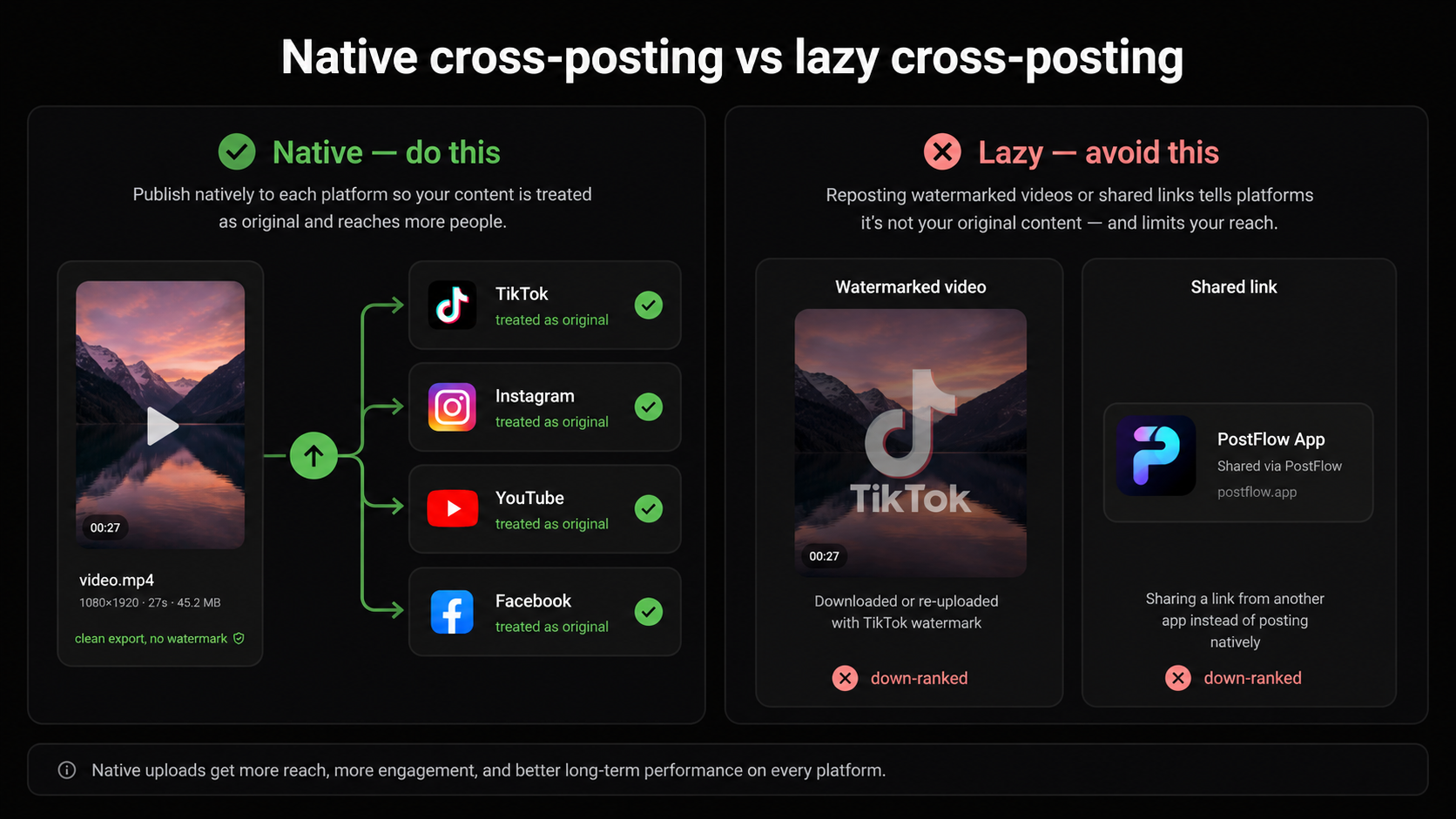
Native cross-posting (do this)
You upload a fresh copy of the content directly to each platform's own composer. TikTok sees an original TikTok. Instagram sees an original Reel. YouTube sees an original Short. Every algorithm treats your content as first-party, which is what earns full distribution.
Lazy cross-posting (avoid this)
You share a link from one app to another, or you let Instagram auto-post to Facebook with the little watermark baked in, or you download a TikTok (logo and all) and dump it on Reels. Every platform can detect content that came from a competitor, and every one of them down-ranks it. This is why some people say "cross-posting doesn't work." They were doing the lazy version.
Why cross-posting works so well
Three forces make cross-posting the best return on effort in social media.
1. Each platform is a separate shot at going viral
Organic reach follows a power law: a small number of your posts get most of the views, and you can't predict which ones. Every platform is an independent draw. Posting one clip to one app is a single lottery ticket. Posting it to nine is nine tickets, for the same production cost.
2. Your audience is scattered across apps
The people who'd love your content aren't all in one place. Some only open TikTok, some live on LinkedIn, some scroll Reels at night and never touch anything else. Posting to one platform reaches one slice. Cross-posting reaches all of them where they already are.
3. The cost per platform drops to almost zero
The expensive part of content is making it: the idea, the filming, the editing. Once that master asset exists, adding another platform costs a caption tweak and a click. You've already paid the hard cost. Cross-posting just collects more of the return on it.
Publish one upload to nine platforms at once with Crossposting. Free to start.
Try it freeIs cross-posting bad for your reach?
This is the question that stops people, so let's kill the myth directly. Cross-posting the same idea to different platforms is fine and encouraged. Every platform is a separate audience, so there's no penalty for showing up on all of them.
What actually causes trouble is narrower than "cross-posting":
- Posting identical content to multiple accounts on the same platform (two of your own Instagram accounts, same Reel). That looks like spam.
- Uploading files with a competitor's watermark still on them.
- Blasting the exact same caption to every network in the same 60 seconds, which reads as automation.
Avoid those three and you'll never have a problem. For the full breakdown, read cross-posting without getting shadowbanned.
Rule of thumb: platforms don't punish you for being on other platforms. They punish files that advertise other platforms.
What you can cross-post
Almost anything, as long as you match it to the right platforms.
- Short-form video (9:16, under 60s): TikTok, Reels, Shorts, Facebook Reels, Pinterest. The highest-leverage format there is.
- Written posts: X, Threads, Bluesky, LinkedIn. One insight, reworded for each network's tone.
- Images and carousels: Instagram, LinkedIn, Facebook, Pinterest.
- Long-form video: YouTube, with clips cut for the short-form feeds.
What "adapted to each platform" actually means
"Adapt it per platform" gets repeated everywhere and explained almost nowhere. In practice it's a small, boring checklist, and it takes about thirty seconds per network once you know it. The video file usually stays identical. What changes is the wrapper around it.
| Platform | Format that works | Caption sweet spot | The one thing to change |
|---|---|---|---|
| TikTok | 9:16 video, 15–60s | 1–2 lines | A hook in the first line, 3–5 niche hashtags |
| Instagram Reels | 9:16 video, under 90s | 1–3 lines | Ask for a share or a save |
| YouTube Shorts | 9:16 video, under 60s | Title, not caption | Write the title like a search query |
| Facebook Reels | 9:16 video | 1–2 plain lines | Less slang, broader framing |
| 9:16 video or tall image | Keyword-rich description | Treat it as a search engine, not a feed | |
| X | Native video upload | Under 280 characters | One punchy line, no external link |
| Threads | Native video or image | Short and conversational | Lead with the text hook |
| Bluesky | Native video or image | Tight, casual | Skip hashtag stuffing |
| Video or carousel | 3–5 short lines | A professional angle, link in comments |
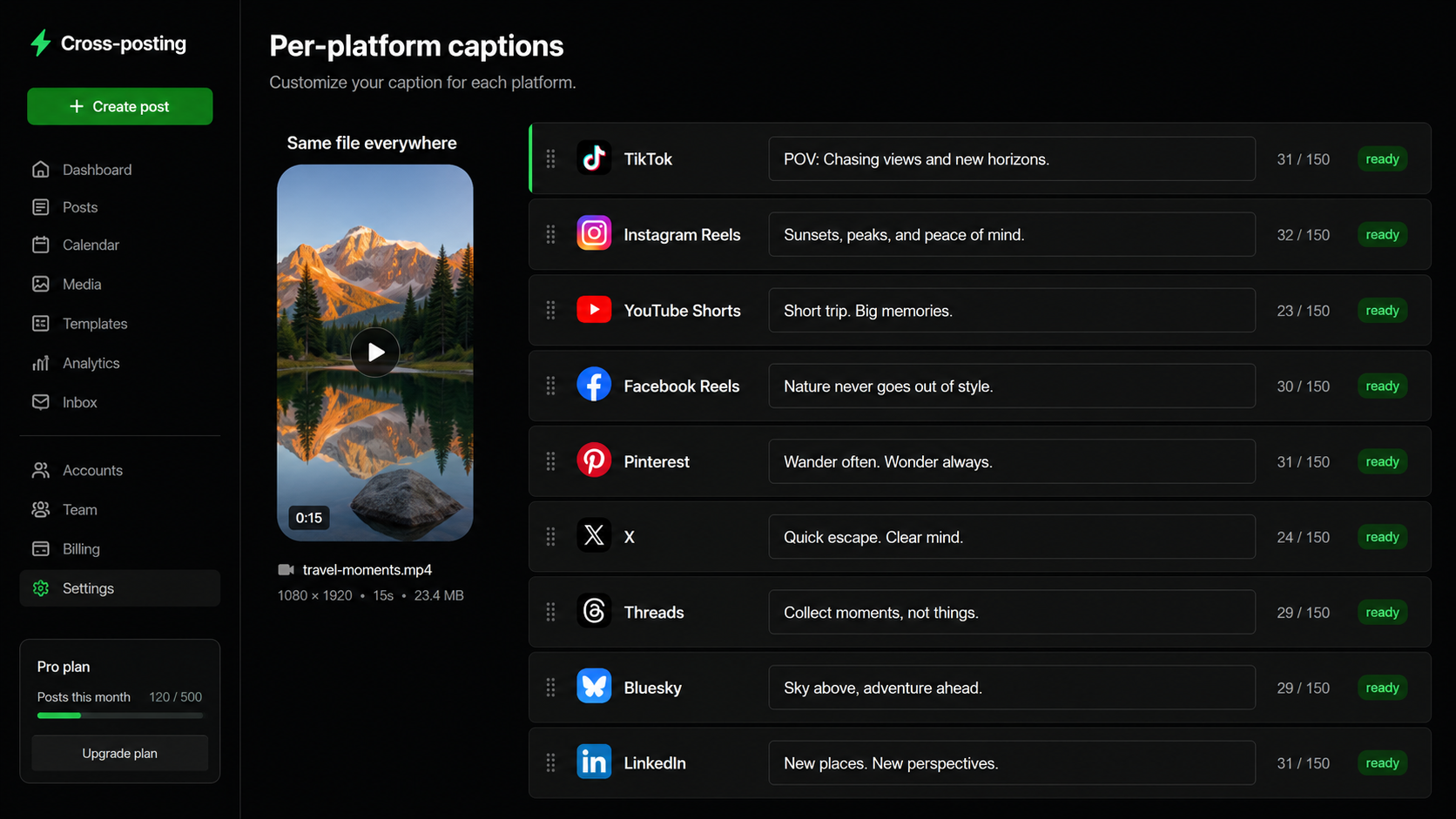
That's the whole adaptation layer. Nobody re-films anything. You swap a caption, retitle for search on YouTube and Pinterest, and drop the hashtags where they don't belong. If you're wondering how much detail each network really needs, how to cross-post from Instagram to TikTok, YouTube and Threads walks through it platform by platform.
How to start cross-posting in 4 steps
- 1Make one master asset in the most portable format (for video, 9:16, under 60s, captions burned in, no watermark).
- 2Adapt the caption per platform: length, hashtags, and call to action.
- 3Publish or schedule to every platform, ideally staggered across the day.
- 4Check the results and lean into whatever's working on each network.
Doing this by hand across nine apps takes about an hour a day, which is why most people quit. A scheduler collapses it into one upload. See the full walkthrough in how to cross-post to multiple platforms, then how to schedule social media posts once you're ready to batch.
The three ways people actually do it
Everyone who cross-posts lands in one of three workflows. They all get content onto multiple platforms; they cost wildly different amounts of your time.
| Workflow | How it works | Time per post | Holds up long-term? |
|---|---|---|---|
| Manual | Open each app, upload, write caption, repeat | 40–60 min | Rarely past a few weeks |
| Native schedulers | Each platform's own scheduler, one at a time | 20–30 min | Only if you're on 2–3 platforms |
| Cross-posting tool | One upload, per-platform captions, one click | 3–5 min | Yes |
The manual route isn't wrong — it's just where most people burn out. Nobody quits cross-posting because it stopped working. They quit because the fifth upload of the same clip at 11pm stops feeling worth it. The workflow is the thing that fails, not the strategy.
The creators who look consistent aren't more disciplined than you. They removed the step where discipline was required.
Which route is right depends on how many platforms you're on. Two platforms, posting a few times a week: do it by hand, honestly. Four or more, posting daily: a tool pays for itself in the first week, and it's usually cheaper than one coffee a month. Buffer vs Hootsuite vs Crossposting compares what's out there.
A real example: one clip, nine posts
Abstract advice is easy to nod along to and hard to act on, so here's cross-posting made concrete. Say you film a 30-second tip about your niche.
- 1TikTok: upload the clean vertical file, add a hook caption and 3–5 niche hashtags.
- 2Instagram Reels: same file, caption that invites a share ("send this to someone who needs it").
- 3YouTube Shorts: same file, a title written like a search query.
- 4Facebook Reels: same file, a slightly broader caption for an older audience.
- 5Pinterest: same file, a keyword-rich description because Pinterest is a search engine.
- 6X: upload the native video with one or two punchy lines.
- 7Threads: a short written hook with the clip attached.
- 8Bluesky: the native clip with a tight caption.
- 9LinkedIn: if it fits a professional angle, the clip with a text hook and no external link.
One 30-second recording became nine native posts. By hand that's an hour of uploading and caption-juggling. With a cross-posting tool it's a single upload and a few caption tweaks. The content was made once; the reach multiplied nine times.
Five mistakes that quietly cost you reach
These won't get you flagged. They just leave views on the table, week after week, in ways that are hard to notice because nothing visibly breaks.
- 1Exporting with the watermark on. Save the clean file from your editor instead of downloading your own TikTok. This is the single most common one, and it costs the most.
- 2Shipping one caption everywhere. A caption stuffed with 20 hashtags reads as spam on LinkedIn; a polished LinkedIn paragraph dies on TikTok. Thirty seconds of editing per platform is the whole fix.
- 3Ignoring the search platforms. YouTube and Pinterest are search engines wearing feed clothing. If your title and description aren't written the way someone would type the question, you're invisible there.
- 4Skipping the platforms you personally don't use. Plenty of creators get most of their reach from a network they never scroll. You don't have to like an app for it to like your content.
- 5Quitting after two weeks. Reach follows a power law: a handful of posts carry the whole account. Two weeks isn't a sample size, it's a coin flip.
None of these are strategy problems. They're setup problems, and each one takes minutes to fix once.
How often should you cross-post?
Cross-posting isn't a one-time trick — it's a daily habit that compounds. The creators who win with it treat every piece of content as something that goes everywhere by default, not just to their favorite platform.
- Every video, every time. If you made it, it should go to all your platforms. Posting to one is leaving free reach on the table.
- Daily if you can. Reach follows a power law — more posts across more platforms means more chances at a breakout.
- Batch it so daily cross-posting doesn't eat your day. See content batching for creators.
The habit matters more than any single post. One viral clip is luck; a system that puts every clip on nine platforms daily is a strategy that turns luck into a numbers game you're set up to win.
How to tell if cross-posting is working
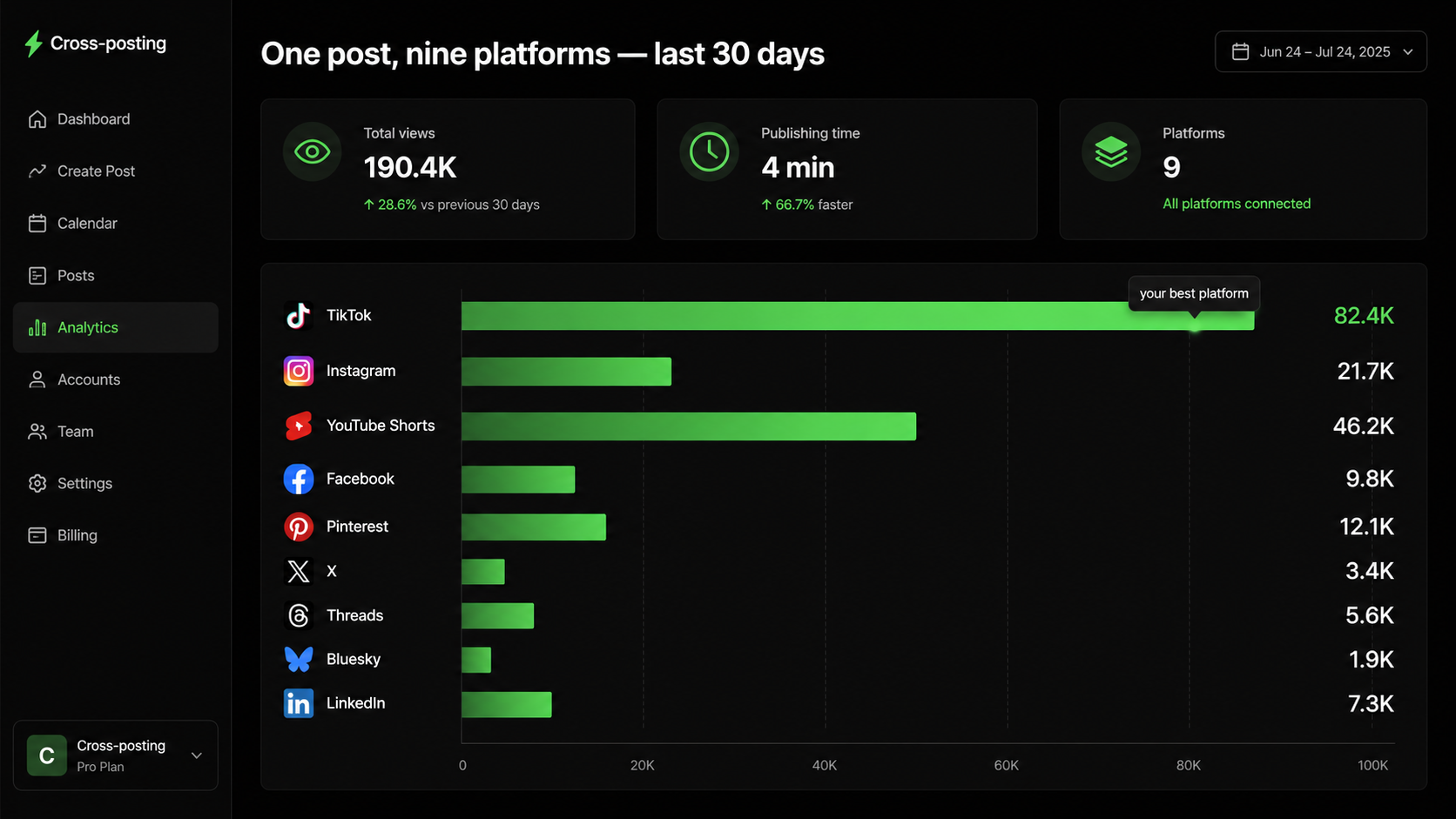
Total follower count is a terrible scoreboard for this, because it hides which platform is actually carrying you. Judge cross-posting per platform, over a month, not per post.
- Views per platform, monthly. Compare each network against itself, never against the others. A thousand views on LinkedIn and fifty thousand on TikTok can both be good months.
- Your best post on each network. The ceiling tells you more than the average. One breakout on a platform means the algorithm is willing to push you there.
- Followers gained per platform. Views that don't convert into follows usually mean the content landed but the profile didn't.
- Time spent publishing. If it's creeping back toward an hour a day, the workflow is quietly failing even when the numbers look fine.
Give it thirty days before you judge anything. Then double down where the ceiling is highest and keep everywhere else on autopilot — it costs you nothing to stay there. If one network is flat while the rest move, that's a platform-specific problem, not a cross-posting one: start with why your TikTok isn't getting views or Instagram Reels not getting views.
Who should cross-post (and who shouldn't)
Cross-posting helps almost everyone making content, but the payoff is biggest for some.
- Creators and influencers: maximum reach for the same production effort — the clearest win.
- Small businesses and founders: be everywhere your customers are without a marketing team.
- Anyone posting short-form video: the same 9:16 clip works natively on five-plus platforms.
- The exception: if a platform genuinely demands unique, platform-specific content for your niche, adapt more heavily there. But even then, the core idea travels.
Frequently asked questions
What does cross-posting mean?
Cross-posting means publishing one piece of content across multiple social media platforms, adapted so it looks native on each. The core idea stays the same while the caption, hashtags, and format change to fit each network.
Is cross-posting bad for engagement?
No. Posting the same idea to different platforms is fine, because each platform is a separate audience. Engagement only suffers if you post links between apps, leave competitor watermarks on files, or blast identical content to multiple accounts on the same platform.
What's the difference between cross-posting and reposting?
Cross-posting is publishing your own content to several platforms at once. Reposting is sharing content again — either someone else's or your own older post. Cross-posting is a distribution strategy; reposting is a recycling one.
How many platforms should I cross-post to?
All the ones where your format works. For short-form video that's typically TikTok, Instagram Reels, YouTube Shorts, Facebook Reels and Pinterest, plus X, Threads, Bluesky and LinkedIn for the text version. Adding a platform costs a caption tweak and gives you another independent shot at reach.
Does cross-posting count as duplicate content?
No. Duplicate content is a search-engine concept about identical pages on the web, not a social media rule. Social platforms don't compare their feeds to each other, so the same video on TikTok and Reels is treated as two original uploads — as long as neither file carries the other platform's watermark.
Can I cross-post automatically?
Yes, with a cross-posting scheduler that uploads native files to each platform through official APIs. Avoid the built-in 'auto-share' toggles (like Instagram to Facebook) that stamp one platform's branding onto another — those get down-ranked.
The takeaway
Cross-posting is the closest thing to free reach in social media: make content once, adapt the wrapper, and let every platform give it an independent shot. Do it natively, skip the watermarks and copy-paste, and you turn one idea into reach on nine networks for the effort it took to make one.
Ready to try it without the hour of app-switching? Start free and publish your first cross-post today.
Put this into practice
Schedule a week of content to every platform in one sitting. Free to start, no card today.
Try Crossposting free